


DarknessInMe
Member
- Jun 19, 2023
- 93
After discussing ways to make an automatic emergency call after a successful attempt in order to minimize the risk of people getting involuntarily involved, I found a way to do this using "Shortcuts" on an iPhone (I tried it by calling another phone with a different text and everything worked as expected.)
Since I don't have access to an Android device, I could not find out if it would be possible to add a similar shortcut there as well, but as far as I was able to look up the conditions and actions in Android's "Bixby Routines", the mechanisms of this feature seem similar to Apple's.
Using an iPhone, we get what we want by creating two shortcuts and two automations.
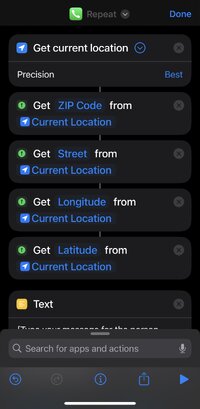
Start with adding a shortcut that includes the following actions:
1. Add the action "Get Current Location"
2. Add the action "Get Details of Location" -> Select "ZIP Code" as "Detail"
3. Add the action "Get Details of Location" -> Select "Street" as "Detail"
4. Add the action "Get Details of Location" -> Select "Longitude" as "Detail"
5. Add the action "Get Details of Location" -> Select "Latitude" as "Detail"
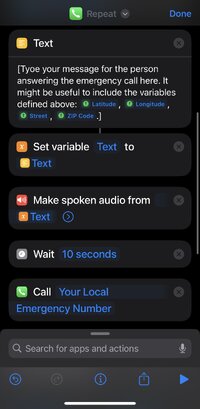
6. Add the action "Text" and type your message for the person answering the emergency call in the textbox.
It might be useful to include the variables defined above: Longitude, Latitude, Street, Town/City, Postcode.
7. Add the action "Set Variable" -> Type "text" as name and select "Text" as input
8. Add the action "Make Spoken audio" -> Select "text"
9. Add the action "Wait" -> Select "10 seconds"
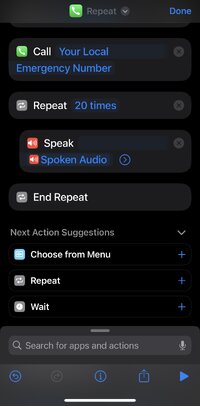
10. Add the action "Call" -> Select a number from your contacts that fits your local emergency number
11. Add the action "Repeat" -> Select "20 times":
12. The "Repeat"-action automatically creates the action "End Repeat". Between "Repeat 20 times" and the "End Repeat", add the action "Speak Spoken Audio".
This should look like this:
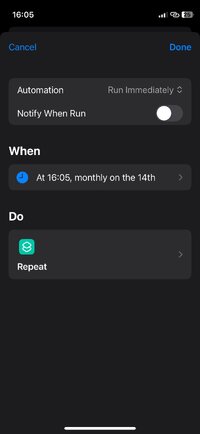
Now, go to "Automation" and add one by selecting "Time of Day". Enter the time when the call should be triggered, but make totally sure not to let the time frame be too short! E. g. when you plan to ctb by hanging, you should at least add one hour to the current time.
Then, select "Repeat Monthly" and (this is extremely important!) "Run Immediately". Now, select your automation you created in step 1.
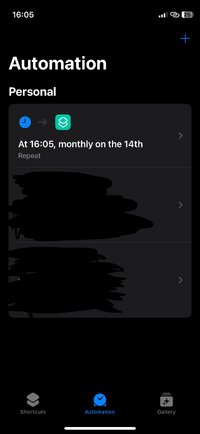
Unfortunately, Apple doesn't provide a feature that lets us run a shortcut only once. To make sure the call doesn't repeat the following month as we selected it in the automation before, we need to add another shortcut that deletes the other one.
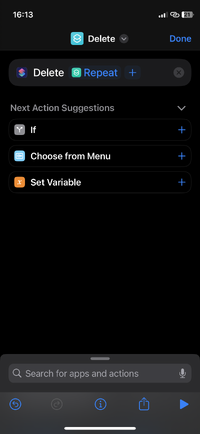
To do this, add another shortcut and add the action "Delete shortcut" -> Select the shortcut you created before.
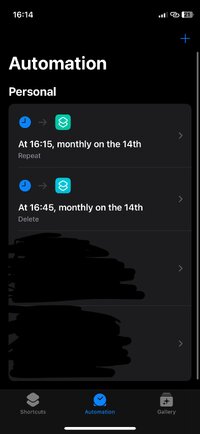
Now, go to "Automation", select the shortcut you've just created and let it run at least have an hour after the initial time of your first shortcut to make sure your call was successful.
Since I don't have access to an Android device, I could not find out if it would be possible to add a similar shortcut there as well, but as far as I was able to look up the conditions and actions in Android's "Bixby Routines", the mechanisms of this feature seem similar to Apple's.
Using an iPhone, we get what we want by creating two shortcuts and two automations.
Start with adding a shortcut that includes the following actions:
1. Add the action "Get Current Location"
2. Add the action "Get Details of Location" -> Select "ZIP Code" as "Detail"
3. Add the action "Get Details of Location" -> Select "Street" as "Detail"
4. Add the action "Get Details of Location" -> Select "Longitude" as "Detail"
5. Add the action "Get Details of Location" -> Select "Latitude" as "Detail"
6. Add the action "Text" and type your message for the person answering the emergency call in the textbox.
It might be useful to include the variables defined above: Longitude, Latitude, Street, Town/City, Postcode.
7. Add the action "Set Variable" -> Type "text" as name and select "Text" as input
8. Add the action "Make Spoken audio" -> Select "text"
9. Add the action "Wait" -> Select "10 seconds"
10. Add the action "Call" -> Select a number from your contacts that fits your local emergency number
11. Add the action "Repeat" -> Select "20 times":
12. The "Repeat"-action automatically creates the action "End Repeat". Between "Repeat 20 times" and the "End Repeat", add the action "Speak Spoken Audio".
This should look like this:
Now, go to "Automation" and add one by selecting "Time of Day". Enter the time when the call should be triggered, but make totally sure not to let the time frame be too short! E. g. when you plan to ctb by hanging, you should at least add one hour to the current time.
Then, select "Repeat Monthly" and (this is extremely important!) "Run Immediately". Now, select your automation you created in step 1.
Unfortunately, Apple doesn't provide a feature that lets us run a shortcut only once. To make sure the call doesn't repeat the following month as we selected it in the automation before, we need to add another shortcut that deletes the other one.
To do this, add another shortcut and add the action "Delete shortcut" -> Select the shortcut you created before.
Now, go to "Automation", select the shortcut you've just created and let it run at least have an hour after the initial time of your first shortcut to make sure your call was successful.


